Your clinic, in one tap.
One app for the front desk, nurses, doctors and patients. On Android and the web.
Try Clinikr on a 7-day demo. Set up your clinic in two minutes — upgrade to keep everything, or it’s deleted after 7 days. Please don’t enter real patient details in the demo.
Get the Android app (demo)A clinic day, from booking to bill.
Every step is one screen away, and the whole team sees it the moment it happens.
- 1
Book
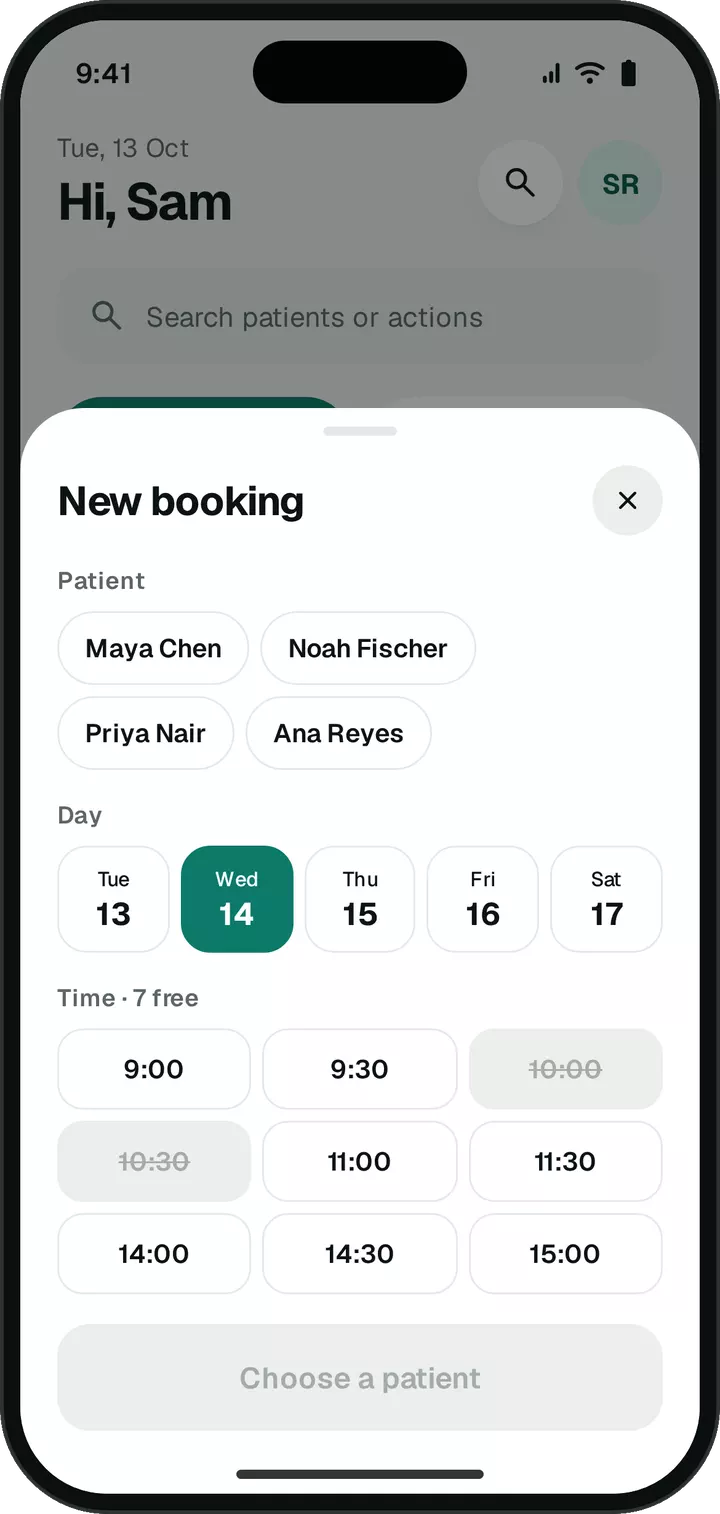
Patient, day and a free slot in one sheet. Walk-ins get a button of their own. The patient gets an email straight away.
![New booking sheet: pick a patient, a day and a free time slot]()
- 2
Check in
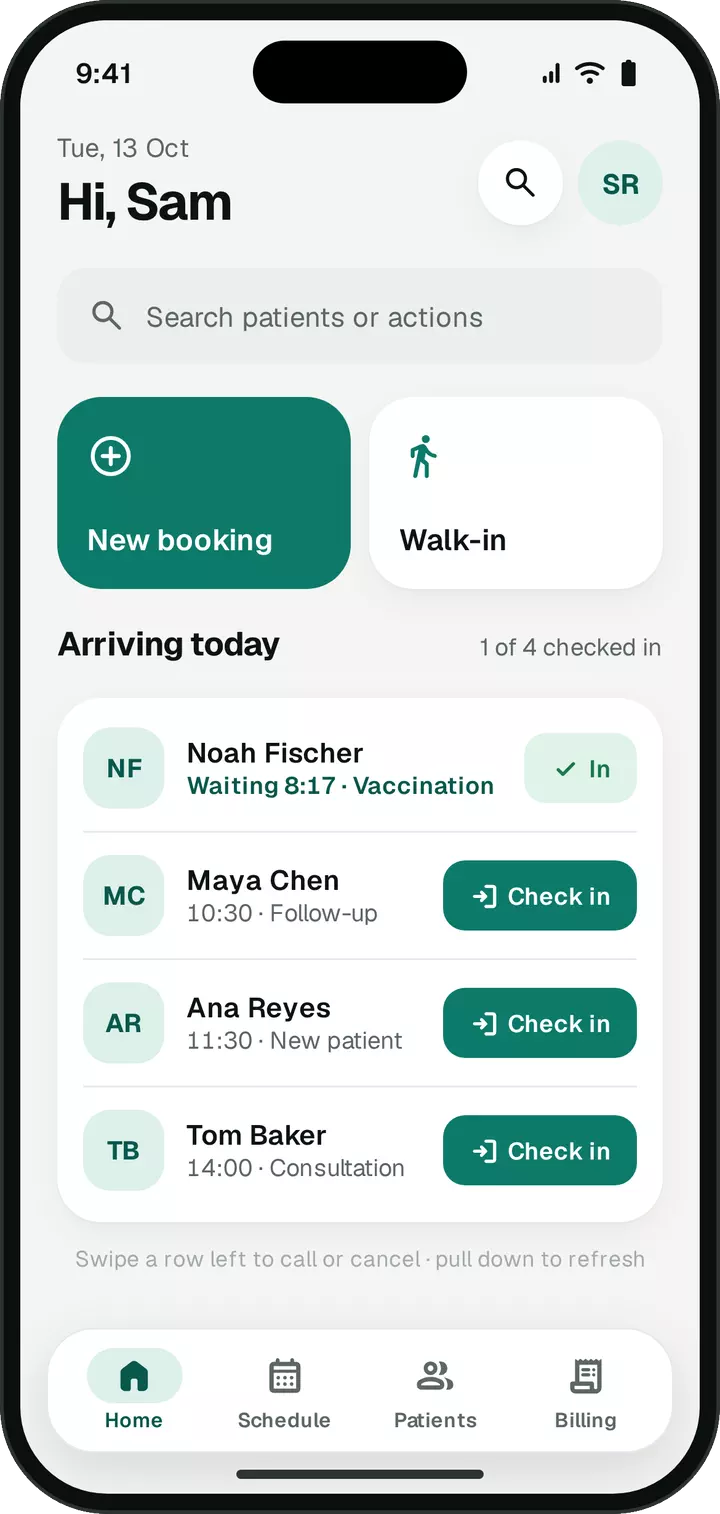
One tap when they arrive starts a live waiting timer the whole team can see. Swipe a row to call or cancel, with Undo.
![Today’s arrivals, each with a Check in button]()
- 3
Vitals
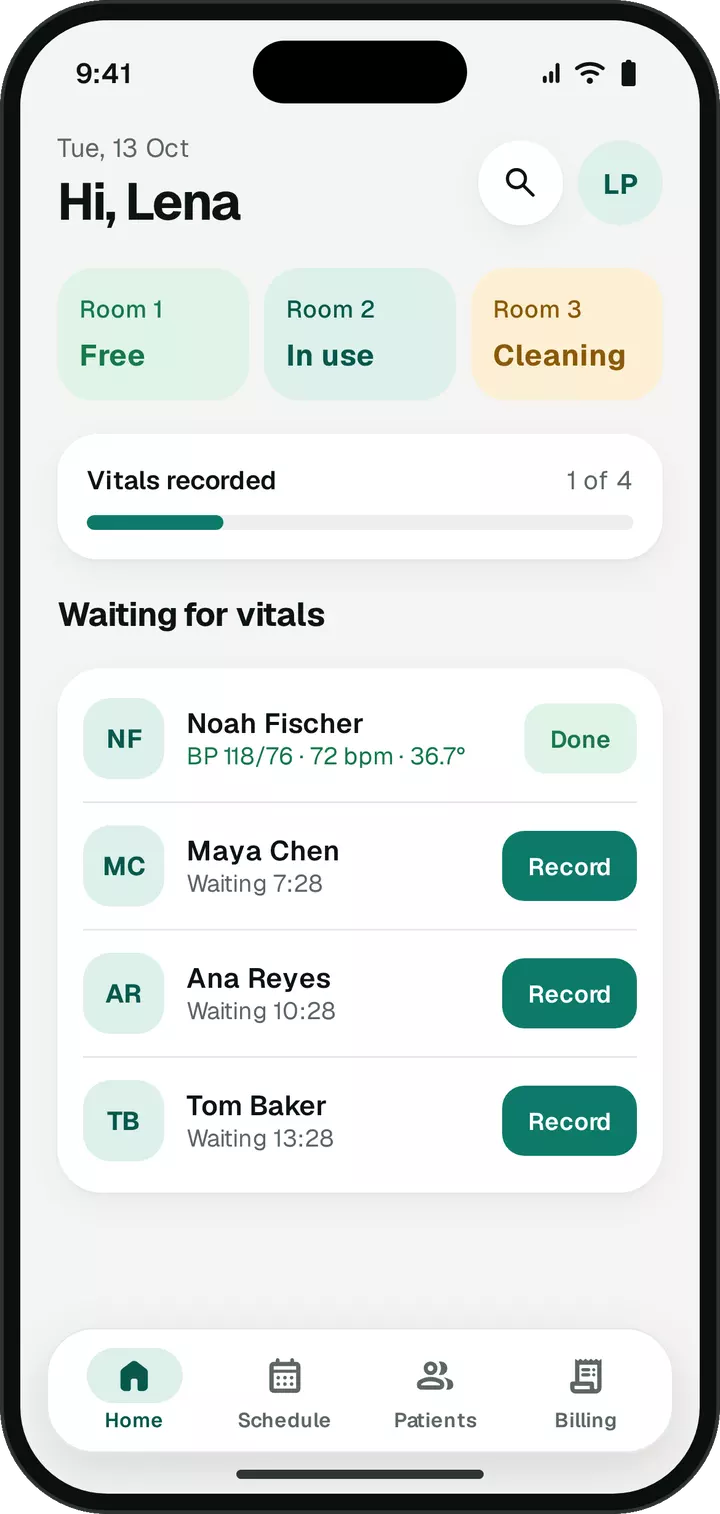
The nurse works down the queue: BP, pulse, temperature and weight. Rooms switch between Free, In use and Cleaning, live for everyone.
![Nurse home with room status and the queue waiting for vitals]()
- 4
Consult
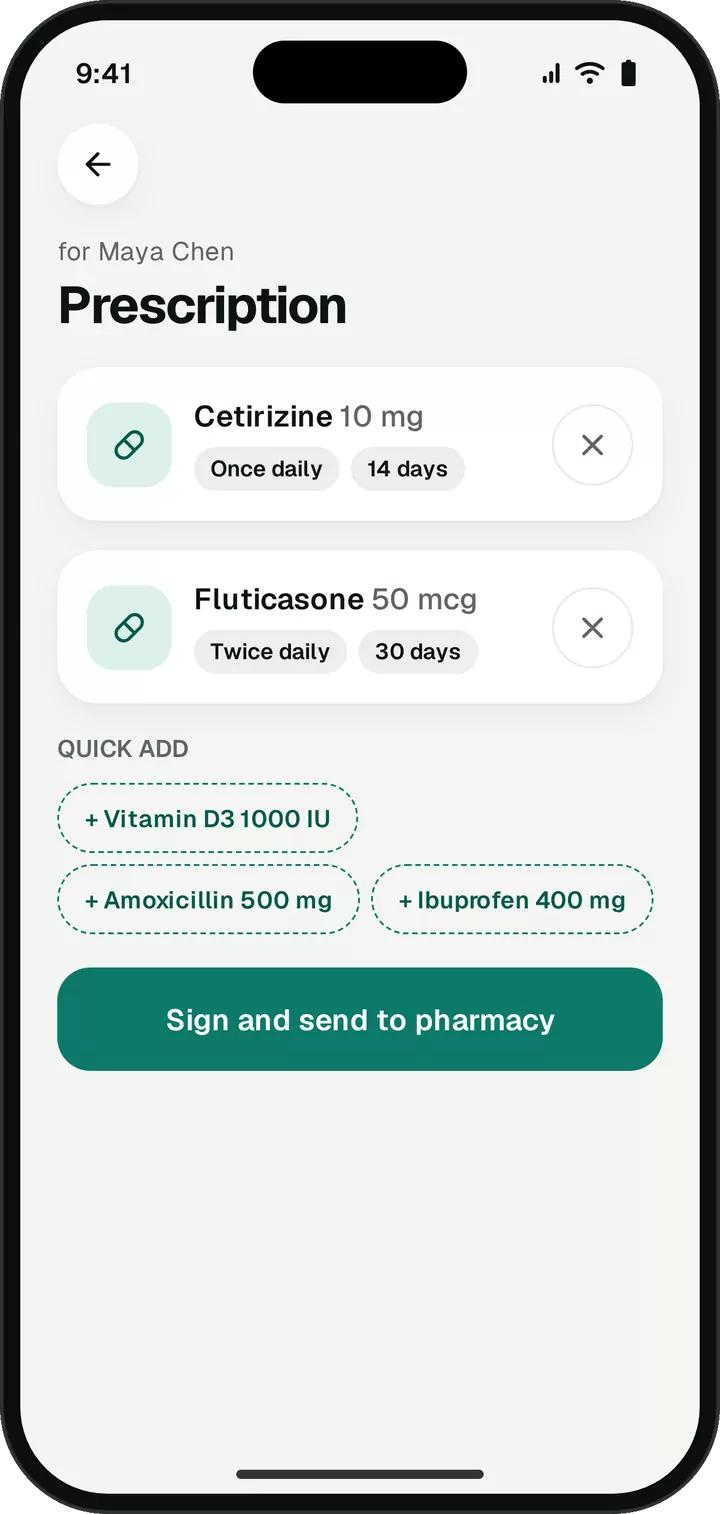
Allergies show before the visit. Dictate the note and review the draft. Prescribe any medicine with dose, frequency and days; your recent medicines are one tap away.
![Prescription screen with medicines, dose and days, and quick-add chips for recent medicines]()
- 5
Bill
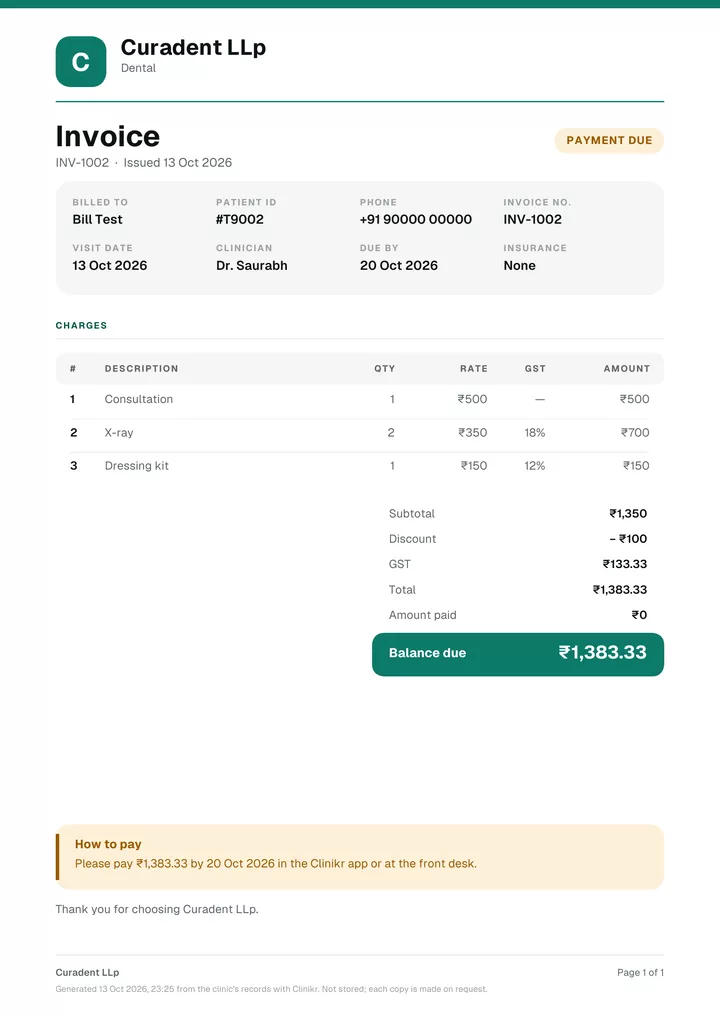
Itemised from your price list, with discount and GST, on your letterhead. The bill and receipt reach the patient as PDF links.
![Itemised invoice PDF on the clinic’s letterhead with GST]()
Patients hear from you. Automatically.
Clinikr emails patients when a visit is booked, moved or cancelled. It sends the visit summary, bill and receipt as PDF links, and welcomes every patient you add.
When a patient books or cancels in the app, the front desk gets a push.
The small things, done properly.
Notes you can talk
Dictate the consultation. Clinikr drafts complaint, findings and plan, and nothing is saved until the doctor reviews it.
Rooms, live
Free, In use, Cleaning — synced for the whole team. Tap one.
Your letterhead
Invoices, receipts, prescriptions and visit summaries as PDFs. Share them on WhatsApp or email.
Locked, not lost
Sign in with an emailed code, no passwords. Phones open with a fingerprint, PIN or pattern.
Android and the web
A phone at the desk, a tablet in the cabin, a laptop at home. Same live day on each.
Your clinic only
Your data never mixes with another clinic’s. Each role sees only what it needs; patients see only their own visits and bills.
Try it for 7 days. Keep it if it fits.
Try Clinikr on a 7-day demo. Set up your clinic in two minutes — upgrade to keep everything, or it’s deleted after 7 days. Please don’t enter real patient details in the demo.
- Day 1Sign up and set up your clinic
- Day 6We email you a day before it ends
- Day 7Upgrade to keep everything you set up
The demo
Every feature, for 7 days. A paid clinic keeps everything you set up during the demo.
Paid plans
Priced for your clinic and your team. Our prices aren’t public — tell us about your clinic and we’ll send you pricing.
Questions, answered.
Something else? hello@clinikr.xyz
How much does Clinikr cost?
Clinikr is a paid product. Prices aren’t public yet: email us with a line about your clinic and your team, and we’ll send you pricing. You can try every feature on the 7-day demo first.
Can I try Clinikr before paying?
Yes. Try Clinikr on a 7-day demo at app.clinikr.xyz. Set up your clinic in two minutes — upgrade to keep everything, or it’s deleted after 7 days. Please don’t enter real patient details in the demo.
What happens when the demo ends?
We email the clinic owner a day before the demo ends. If you upgrade to a paid plan, your clinic keeps everything you set up during the demo. If you don’t, the demo clinic and its data are deleted 7 days after sign-up.
Which devices does Clinikr run on?
There’s an Android app (demo), and the full app runs in any modern browser — on a laptop, a tablet or an iPhone. There’s no iOS app yet.
Does Clinikr message patients?
Yes, by email and automatically. Patients get an email when a visit is booked, moved or cancelled, a reminder the evening before, and their visit summary, bill and receipt as PDF links. Patients you add with an email get a welcome. When a patient books or cancels in the app, the front desk gets a push notification.
Does it send reminders on WhatsApp?
Not directly. Reminders and visit emails go out by email. PDFs — bills, prescriptions and visit summaries — can be shared to WhatsApp from your phone’s share sheet.
How does the team sign in?
With an email address and a one-time code — no passwords. A new email gets its own clinic and a short setup. Owners invite team members by email, and patients you add with an email can sign in to see their own visits and bills.
Who can see patient data?
Only your clinic. Each clinic’s data is separate: it lives in a Postgres database with row-level security per clinic and per role, so a nurse, a doctor and a patient each see only what they should. Patients see only their own records. Read the privacy policy.
How do voice notes and prescriptions work?
The doctor dictates; the phone turns speech into text, and an AI model drafts a structured note — complaint, findings and plan. The doctor reviews and edits it, and nothing is saved until they do. Prescriptions take any medicine with dose, frequency and days, and remember your clinic’s recent medicines.
Does Clinikr work offline?
No. Clinikr needs an internet connection, so the whole team always sees the same live data.
Does it handle pharmacy stock or lab results?
Not today. Clinikr covers appointments, check-ins, vitals, notes, prescriptions, bills and patient emails. There’s no pharmacy inventory or lab-results module.